Deploy Smarter with AI: Introducing App Platform Skills on DigitalOcean

By Bikram Gupta
- Published:
- 7 min read
AI coding assistants have fundamentally changed how developers write software. Tools like Claude Code, Codex, GitHub Copilot, Gemini, and Cursor can scaffold an entire application in minutes. But ask any of them to deploy that application to a production cloud environment, and the experience breaks down — not because models lack intelligence, but because they lack current, opinionated infrastructure knowledge. Cloud platforms evolve faster than training data refreshes: instance sizes change, new features ship, and battle-tested best practices emerge from customer feedback that never makes it into public documentation.
Today, we’re announcing App Platform Skills, a collection of open-source, AI-native playbooks that bridge this gap. Skills inject up-to-date, opinionated DigitalOcean App Platform knowledge directly into your AI assistant’s context — turning it from a generic code generator into an infrastructure-aware co-pilot that understands deployment models, networking primitives, database bindings, and operational patterns.
npx skills add digitalocean-labs/do-app-platform-skills
That single command gives your AI assistant access to 12 specialized skills covering everything from greenfield app design to Heroku migration to production troubleshooting.
Benefits
-Production-Ready from the Start: Skills encode patterns from thousands of real deployments — VPC networking by default, PostgreSQL v16 with SSL required, credentials in GitHub Secrets — so AI-generated configuration aligns with how experienced platform engineers actually build.
-Composable Skill Chaining: Skills work together. Describe a new app to the designer skill, and the planner skill decomposes deployment into staged phases while the deployment skill generates a GitHub Actions workflow to execute the rollout.
-Zero Credential Exposure: The AI agent never handles sensitive credentials directly. Workflows reference GitHub Secrets by name, managed services use bindable variables like ${db.DATABASE_URL}, and ephemeral credentials follow a generate-use-delete pattern.
What Are Skills?
Skills are not documentation, and they’re not templates. They’re structured knowledge packages designed specifically for AI consumption — concise decision trees, opinionated defaults, and production-tested patterns that an LLM can reason over to produce correct infrastructure configuration on the first try.
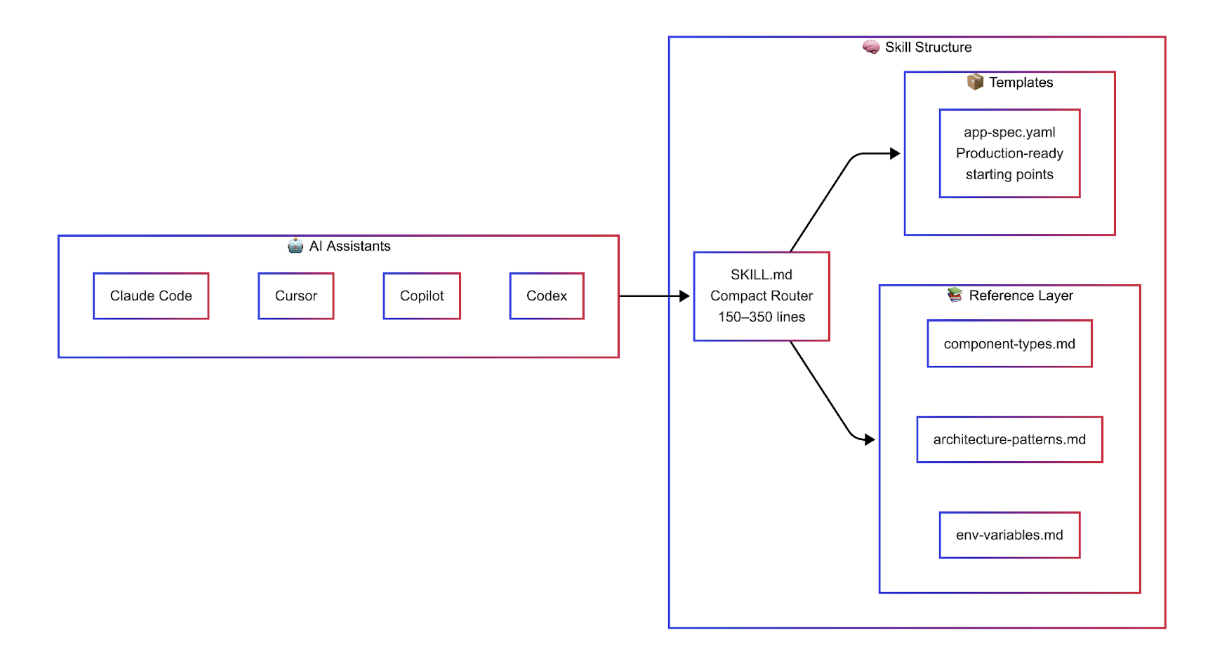
This two-tier design is deliberate. AI context windows are finite. A 300-line router with pointers to deeper references is far more effective than dumping thousands of lines of documentation into context and hoping the model finds what it needs. The top-level SKILL.md acts as a compact router that helps the AI quickly identify the right workflow, while detailed reference material lives in sub-directories, loaded on demand only when deeper context is required.
Opinionated by Design
The most important design decision we made was to be opinionated. Skills don’t present every possible option — they make choices: -VPC networking by default — not public endpoints
-GitHub Actions for CI/CD — not deploy-on-push
-PostgreSQL v16 with SSL required — not optional
-Dockerfiles preferred over buildpacks — more control, more reproducible
-Credentials in GitHub Secrets — never in code, never visible to the AI
These opinions come from patterns we’ve seen across thousands of production deployments. When an AI assistant uses these skills, it produces configuration that aligns with how experienced App Platform users actually architect their systems.
Skills in Action: Designing a New Application
Here’s a concrete scenario. You’re building a multi-component SaaS application: a React frontend, a Node.js API, a background worker for async tasks, and a PostgreSQL database. Without Skills, you’d spend time reading documentation, cross-referencing instance sizes, and manually stitching together an App Spec YAML.
With the designer skill loaded, you describe your application in natural language, and the AI produces a production-ready App Spec:
name: my-saas-app

region: nyc

services:

  - name: web

    github:

      repo: myorg/frontend

      branch: main

      source_dir: /frontend

    build_command: npm run build

    instance_size_slug: apps-s-1vcpu-1gb

    instance_count: 2

    http_port: 3000

    routes:

      - path: /

  - name: api

    github:

      repo: myorg/backend

      branch: main

      source_dir: /api

    instance_size_slug: apps-s-1vcpu-1gb

    envs:

      - key: DATABASE_URL

        scope: RUN_TIME

        value: ${db.DATABASE_URL}

    routes:

      - path: /api

workers:

  - name: upload-processor

    github:

      repo: myorg/backend

      branch: main

      source_dir: /worker

    instance_size_slug: apps-s-1vcpu-0.5gb

    envs:

      - key: DATABASE_URL

        scope: RUN_TIME

        value: ${db.DATABASE_URL}

databases:

  - name: db

    engine: PG

    version: "16"

    production: true
Notice the details the skill gets right that a generic AI would miss: the ${db.DATABASE_URL} bindable variable syntax for automatic credential injection, correct instance size slugs, separate source directories for a monorepo, and the worker component using a smaller instance size since it doesn’t serve HTTP traffic.
Beyond Design: Migration, Dev Parity, and Debugging
The designer skill is just one of 12. Here’s how Skills handle other common workflows:
Platform Migration. The migration skill maps Heroku, AWS, Render, Railway, and Fly.io primitives to App Platform equivalents. It translates your Procfile processes into the correct component types (services, workers, jobs), maps add-ons to DigitalOcean equivalents — knowing, for example, that Heroku Redis maps to DigitalOcean’s Valkey, not Redis (which has reached end-of-life on the platform) — and produces a complete migration package with translated App Spec, pre-flight checklist, and GitHub Actions deployment workflow.
Local Development with Production Parity. The devcontainers skill generates a complete local development environment that mirrors your App Platform configuration — matching database versions, wiring environment variables with the same bindable variable patterns, and running connectivity tests on startup to verify everything works before you push to production.
The Complete Skill Catalog
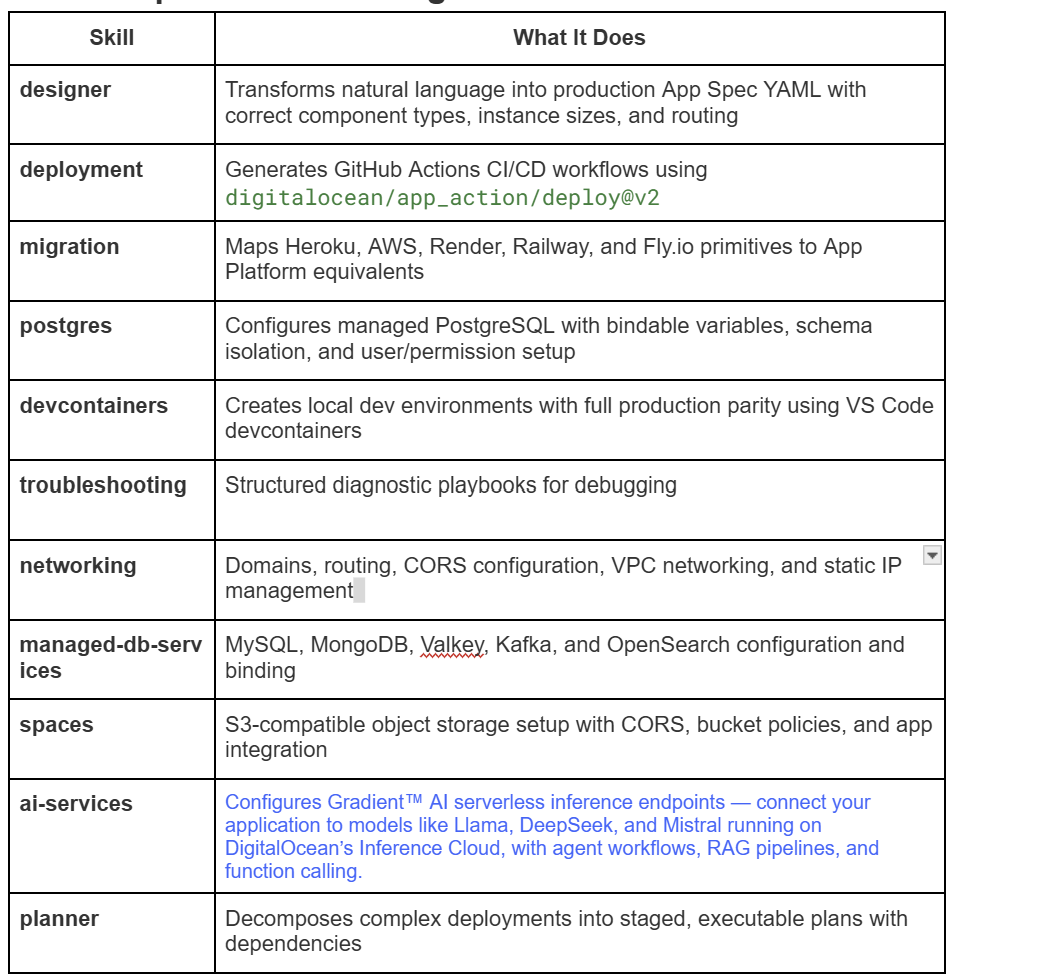
Skills are composable by design. A typical greenfield deployment might chain devcontainers → designer → planner → deployment into a single coherent workflow.
Building AI-Native Applications on the Inference Cloud
Modern applications aren’t just web frontends backed by a database. Increasingly, they’re AI-native — integrating inference endpoints for features like semantic search, content generation, recommendations, and autonomous agent workflows. These applications need compute, storage, databases, and GPU-accelerated inference working together as a unified stack.
DigitalOcean’s Inference Cloud provides exactly this: a single platform where your application services, managed databases, object storage, and Gradient™ AI serverless inference endpoints all live within the same VPC, deployed through a single App Spec. Managed databases connect through automatic bindable variables like ${db.DATABASE_URL}, while Spaces and Gradient AI endpoints are configured as environment variables with credentials securely stored in GitHub Secrets. Skills understand this full picture — and the distinction between these integration patterns — so they can configure every layer of the stack correctly from a single natural-language request.
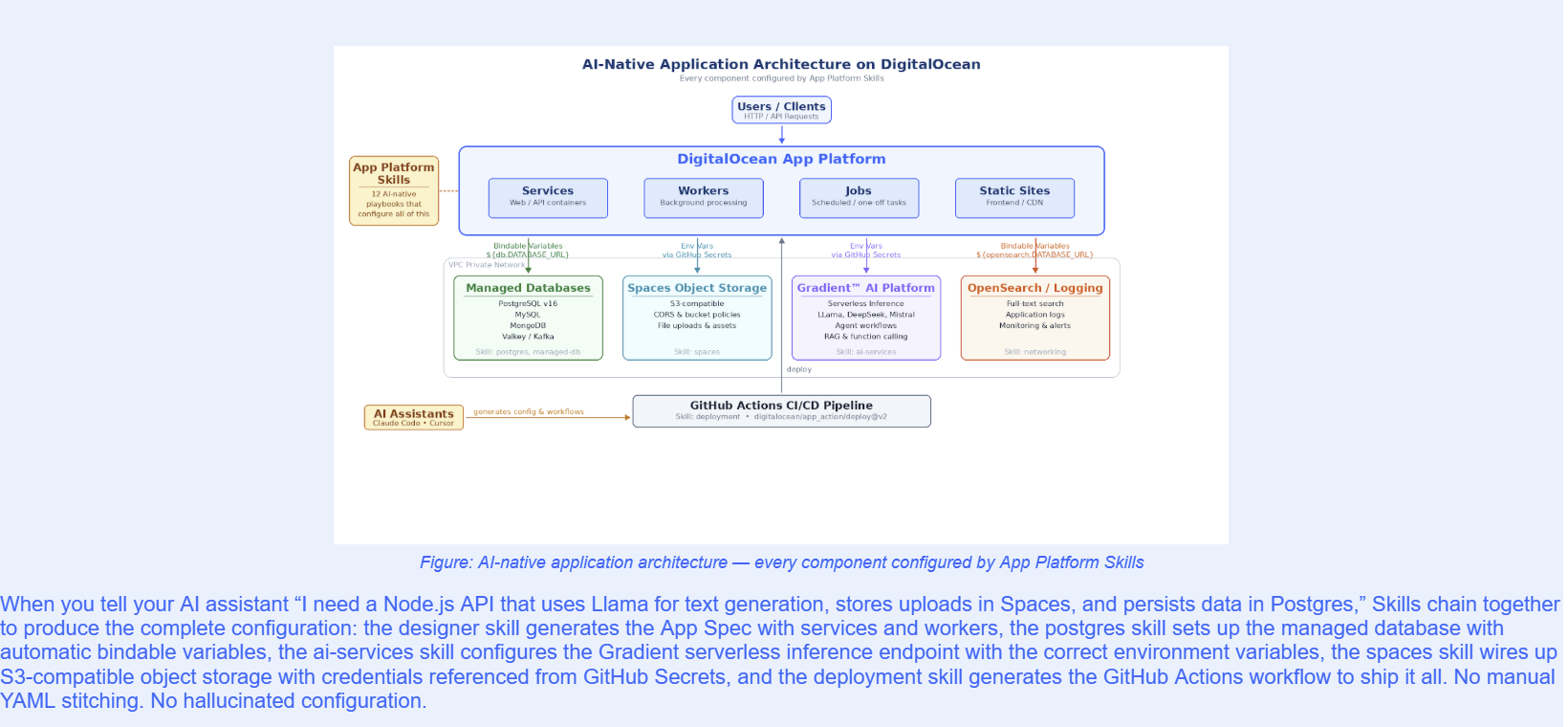
Security: Credentials the AI Never Sees
A natural concern with AI-assisted infrastructure is credential security. We designed Skills with a strict principle: the AI agent never handles sensitive credentials directly. The system uses a three-tier credential hierarchy:
-GitHub Secrets (recommended): The AI generates workflow files that reference secrets by name (e.g., ${{ secrets.DIGITALOCEAN_ACCESS_TOKEN }}). The user adds the actual values through the GitHub UI. The AI never sees the credential value.
-Bindable Variables: For managed services like databases and caches, App Platform automatically injects credentials at runtime using the ${db.DATABASE_URL} syntax. No secrets appear in configuration files.
-Ephemeral Patterns: When temporary credentials are needed (e.g., for one-time data migrations), skills use a generate-use-delete pattern and remind the user to rotate credentials after the operation.
How to Get Started
Adding App Platform Skills to your development workflow takes one command:
npx skills add digitalocean-labs/do-app-platform-skills
This makes all 12 skills available to your AI assistant. From there, describe what you need in natural language. The root skill acts as a router, directing your request to the appropriate specialized skill:
-
“I need to deploy a Django app with Postgres” → designer + postgres + deployment
-
“Migrate my Heroku app to DigitalOcean” → migration + postgres + planner
-
“Set up local dev for my project” → devcontainers
-
“My app is returning 502 errors” → troubleshooting
Make sure to periodically check and update the skills.
# Check if any installed skills have updates

npx skills check

# Update all skills to latest versions

npx skills update
Prerequisites
-doctl v1.82.0+ (DigitalOcean CLI) — authenticated with your API token
-git and a GitHub account with repository access
-Docker (for devcontainers and local testing)
-An AI assistant: Claude Code, Cursor, GitHub Copilot, or any tool that supports skills
What’s Next
App Platform Skills is open-source and actively maintained. We’re building in the open because we believe infrastructure knowledge should be a community asset, not a walled garden. The repository includes contribution guidelines, a skill schema for building your own custom skills, and validation tooling to ensure quality.
We’re already working on expanded skill coverage — including deeper integration with DigitalOcean products.
Get Started
The gap between AI-generated code and production-ready infrastructure doesn’t have to exist. Skills close it by giving your AI assistant the same knowledge your most experienced platform engineer has — encoded in a format it can actually use.
As more applications become AI-native — combining traditional compute with inference endpoints, vector search, and agent workflows — the ability to configure and deploy the full stack from a single conversation becomes essential. App Platform Skills make DigitalOcean’s Inference Cloud the easiest place to build and deploy these applications: from idea to production-ready App Spec to live deployment, guided by AI every step of the way.
Install App Platform Skills and start building: github.com/digitalocean-labs/do-app-platform-skills
About the author

Related Articles

Native .NET Buildpack Support is Now Available on App Platform
- March 5, 2026
- 2 min read
Supabase Template is Now Available on DigitalOcean App Platform
- February 26, 2026
- 3 min read

Expanding our Agentic Inference Cloud: Introducing GPU Droplets Powered by AMD Instinct™ MI350X GPUs
- February 19, 2026
- 2 min read