Automate your infrastructure
Our robust API, CLI, and native integrations are engineered for digital-native enterprises and agile teams. Spend less time managing infrastructure and more time shipping code.
DigitalOcean tools
Whatever you're looking for, DigitalOcean has the right tools for the job.

doctl compute droplet create \
  "sub-01.example.com" "sub-02.example.com" \
  --region nyc3 --size s-1vcpu-1gb --image ubuntu-20-04-x64 \
  --enable-ipv6
CLI
Our web-based control panel provides a convenient, point-and-click interface for managing Droplets. But for those times when you want to use the command line, we've got doctl. Our open source doctl utility is a helpful tool for managing Droplets and other resources from the command line. It can greatly reduce the amount of manual interaction with web-based interfaces needed for daily development and administrative tasks.
Explore doctl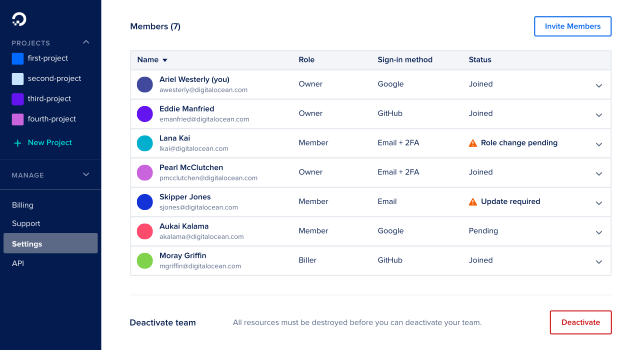
Work seamlessly with your team
Enable unified collaboration for free on all DigitalOcean accounts. Manage and grow your infrastructure with distinct user roles, a single invoice, and no shared credentials.
Learn moredroplet = DropletKit::Droplet.new(
names: ['sub-01.example.com', 'sub-02.example.com'],
region: 'nyc3',
size: 's-1vcpu-1gb',
image: 'ubuntu-20-04-x64',
ipv6: true,
tags: ['web']
)
client.droplets.create_multiple(droplet)curl -H "Content-Type: application/json" \
-H "Authorization: Bearer b7d03a6947b217efb6f3ec3bd3504582" \
-d '{"names":["sub-01.example.com","sub-02.example.com"],
"region":"nyc3","size":"s-1vcpu-1gb","image":"ubuntu-20-04-x64"}' \
-X POST "https://api.digitalocean.com/v2/droplets"createRequest := &godo.DropletMultiCreateRequest{
Names []string{"sub-01.example.com","sub-02.example.com"},
Region: "nyc3",
Size: "s-1vcpu-1gb",
Image: godo.DropletCreateImage{
Slug: "ubuntu-20-04-x64",
},
IPv6: true,
Tags: []string{"web"},
}doctl compute droplet create \
"sub-01.example.com" "sub-02.example.com" \
--region nyc3 --size s-1vcpu-1gb --image ubuntu-20-04-x64 \
--enable-ipv6API
Manage your Droplets with greater flexibility using conventional HTTP requests. Take any number of actions or requests with curl commands or use our official API wrappers, including creating multiple Droplets, resizing, rebooting, enabling backups, and more.
API documentationIntegrate natively with your stack
Seamlessly automate and monitor your infrastructure using tools like Terraform, Slack, and Puppet.
resource "digitalocean_tag" "web" {
  name = "web"
}

resource "digitalocean_droplet" "web" {
  count  = 2
  image  = "ubuntu-20-04-x64"
  name   = "sub-${count.index + 1}.example.com"
  region = "nyc3"
  size   = "s-1vcpu-1gb"
  ipv6   = true
  tags   = [digitalocean_tag.web.id]
}
Terraform Enterprise
Treat your infrastructure like code with Terraform. Create, manage, and manipulate resources including physical machines, VMs, network switches, containers, etc.
Explore Hashicorp Terraform integration
Create a DC/OS cluster with Terraform
DC/OS (the data center operating system) is an open-source, distributed operating system based on the Apache Mesos distributed systems kernel. DC/OS manages multiple machines - in the cloud or on-site - from a single interface; it also deploys containers, distributed services, and legacy applications into those machines and provides networking, service discovery, and resource management to keep the services running and communicating with each other.

Slack integration
Easily integrate our Monitoring service with your Slack account via OAuth when you create your alert policy. Instantly receive notifications in your Slack channel whenever a new alert is triggered.
Even more integrations







Frequently Asked Questions
What types of tools and integrations does DigitalOcean offer?
DigitalOcean offers a wide range of tools and integrations to help you build, deploy, and manage your applications more efficiently. This includes tools like Terraform, Packer, and Ansible for infrastructure as code, as well as integrations with popular platforms like GitHub and GitLab for continuous deployment.
What are some of the key integrations for App Platform?
App Platform integrates with popular Git providers like GitHub and GitLab for continuous deployment. Whenever you push code to your repository, App Platform can automatically build and deploy your application. This streamlines the development lifecycle and makes it easy to maintain an up-to-date application.
What is the benefit of using Terraform with DigitalOcean?
Using Terraform with DigitalOcean allows you to define and manage your infrastructure in a declarative way. You can create, update, and delete resources like Droplets, VPCs, and Managed Databases by simply editing configuration files. This helps you maintain a consistent and well-documented infrastructure environment.
How do networking tools improve application performance?
What are some of the key solutions that DigitalOcean's tools enable?
Start building today
From GPU-powered inference and Kubernetes to managed databases and storage, get everything you need to build, scale, and deploy intelligent applications.