What is VPC Cost Optimization? Best Practices to Reduce Your Cloud Spend

By Jesse Sumrak
Sr. Content Marketing Manager
- Updated:
- 12 min read
Cloud computing has changed how businesses operate, offering impressive scalability, flexibility, and resource efficiency. Virtual Private Clouds (VPCs) are a key component of this cloud adoption shift, providing isolated network environments within public cloud infrastructures. VPCs allow organizations to use cloud resources while maintaining control over their network setup, security policies, and data privacy. However, as businesses grow their cloud presence, costs can climb quickly due to over-provisioned resources, inefficient network configurations, and poor instance choices.
But there are many ways to optimize VPC costs without sacrificing performance or security. By making smart changes, companies can reduce their cloud spending and improve their overall cloud architecture at the same time. Read on to explore VPC cost optimization best practices and how you can improve your cloud spending to maximize cloud ROI and build a more cost-effective cloud infrastructure.
Key takeaways:
-
Overprovisioned VPC resources, inefficient network design, and idle instances are common cost drains—rightsizing compute, storage, and database configurations can save hundreds to thousands of dollars monthly.
-
Tools like DigitalOcean Monitoring, Prometheus, and Datadog help detect underutilized workloads and reveal optimization opportunities across compute, storage, and bandwidth.
-
Adopting strategies like auto-scaling, spot instances, and tiered storage allows you to scale cost-effectively without sacrificing performance.
-
Transparent pricing models—like DigitalOcean’s predictable billing—make it easier to forecast cloud spend and avoid the hidden fees common with hyperscalers.
What is VPC cost optimization?
VPC cost optimization is the process of managing and reducing expenses associated with your virtual private cloud resources, through providers like DigitalOcean, AWS, or Google Cloud, while still maintaining performance and security. This practice involves analyzing your cloud usage, identifying inefficiencies, and implementing cost-effective solutions across various components of your VPC. For example, rightsizing overprovisioned instances or eliminating idle resources could save hundreds or thousands of dollars monthly—savings you can reinvest in product development, marketing ideas, or scaling your team.
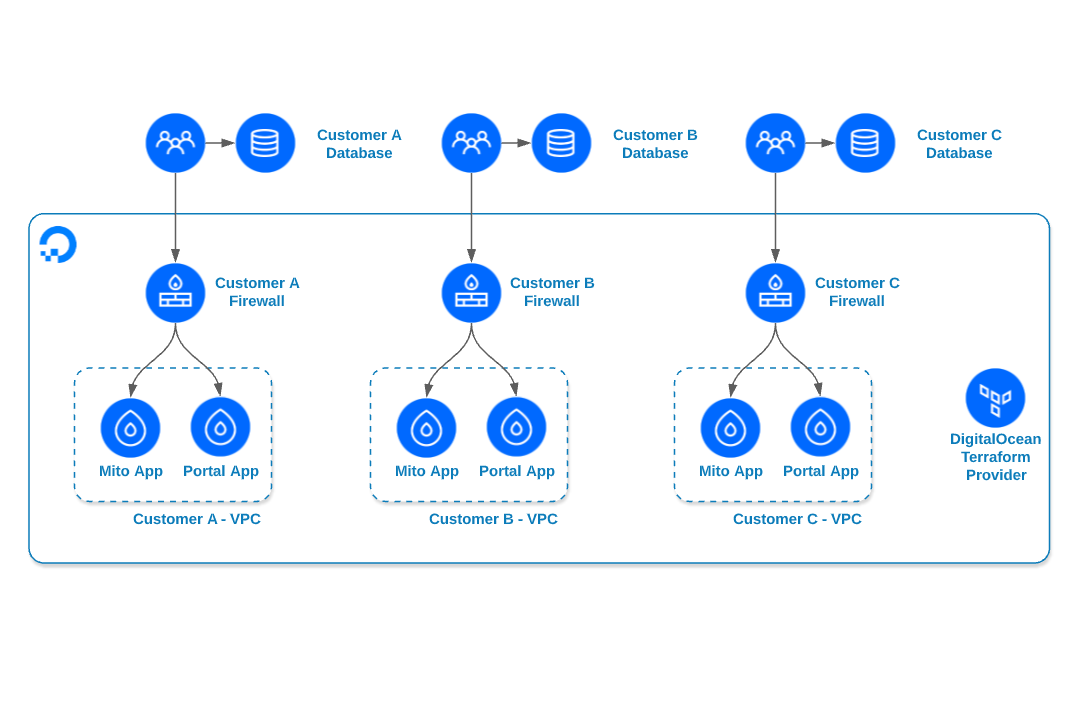
DigitalOcean customer Zuar created separate VPCs per customer to isolate workloads and gain more predictable cost control on their cloud network.
What is VPC vs VPN?
VPCs and VPNs serve different purposes. While a VPC is an isolated section of cloud infrastructure where you deploy and manage your resources, a Virtual Private Network (VPN) is a secure encrypted tunnel that connects your device or network to another network over the internet—the key difference being that a VPC is about where your cloud resources live, while a VPN is about how you securely access networks from anywhere.
That said, they share some similarities around managing and securing traffic. Specifically, both:
-
Are designed to isolate traffic from the public internet.
-
Implement tools and protocols to improve security.
-
Offer customizable network architecture and support hybrid cloud setups.
-
Can be securely accessed remotely.
Understand the key differences between VPCs vs VPNs to choose the right secure networking solution for your infrastructure needs. Learn when to use a VPC—such as for internal cloud communication, multi-region backend synchronization, and cloud-native Kubernetes networking—and when to use a VPN for connecting on-premises data centers to the cloud, enabling remote workforce access, or securing sensitive data transfers.
Where to optimize VPC costs
A VPC infrastructure consists of multiple interconnected elements—from compute and storage to networking and monitoring—each contributing to your overall cloud bill. Understanding these components is the first step toward effective cost optimization. The most common areas for VPC cost optimization include:
-
Resource allocation: Ensure that your virtual machines, storage, Kubernetes clusters, and other cloud resources are appropriately sized for your workloads. This means avoiding overprovisioning (paying for unused capacity) and underprovisioning (causing performance issues that could impact your users).
-
Network design: Optimize your VPC’s network architecture to minimize data transfer costs and improve performance. For example, Batch, a data observability and replay platform, uses DigitalOcean’s VPC to attach all resources to the private network and block public traffic—reducing public egress/ingress surprises and improving cost-efficiency.
-
Instance management: Use the most cost-effective virtual machine Droplet types, sizes, and pricing models for your specific needs. This might mean choosing a memory-optimized Droplet for database workloads or a general-purpose Droplet for web applications, rather than overprovisioning with higher-tier instances.
-
Storage optimization: Select the best storage solution and manage the data lifecycle from active use to archival and deletion to minimize storage costs. For instance, moving infrequently accessed data to lower-cost object storage like Spaces and setting up automated deletion policies for outdated backups.
-
Monitoring and analytics: Use cloud monitoring tools like DigitalOcean Monitoring, Insights, and third-party observability platforms (e.g., Prometheus, Grafana, Datadog) to track resource usage, detect underutilized workloads, and uncover cost-optimization opportunities. These tools can reveal insights on your cloud metrics like CPU utilization consistently below 20%, storage volumes with minimal I/O activity, or network bandwidth that’s far below your provisioned limits—all signals that you’re overpaying for resources.
Learn how to deploy a highly available e-commerce website across multiple regions using DigitalOcean’s Global Load Balancer and VPC peering. This tutorial covers setting up redundant Droplets, configuring a high-availability MySQL database, and connecting everything through secure private networking.
Benefits of optimizing VPC costs
VPC cost optimization isn’t just about trimming expenses. It’s about creating a more intentional, efficient infrastructure that improves performance, supports future growth, and strengthens your ability to adapt as your business evolves.
-
Better resource allocation: Cost optimization naturally leads to a clearer understanding of which resources your applications actually use. This often results in right-sizing compute, reducing unused storage, and eliminating idle networking components—ultimately creating a cleaner, more efficient infrastructure footprint.
-
Improved performance: When resources are sized correctly, systems tend to run better. Overloaded components get the capacity they need, and underutilized ones stop eating into performance headroom. The result is faster response times, fewer bottlenecks, and more consistent application behavior.
-
Increased scalability: An optimized environment is easier to scale because it isn’t weighed down by unnecessary overhead. You can add or remove resources more predictably, and scaling patterns become clearer when you’re not masking inefficiencies with oversized infrastructure.
-
Improved reliability: By aligning resources with actual demand and removing unnecessary components, you reduce the risk of unexpected failures and make your overall architecture more resilient.
-
Stronger security posture: Removing unused resources, reducing exposed endpoints, and simplifying your network structure helps tighten access controls and minimize the attack surface. NAT gateways hide VPC resources from public exposure and centralize the control of egress traffic. DigitalOcean simplifies NAT gateway management to avoid the cost and complexity involved in self-managing NAT instances.
-
Greater business agility: Lower infrastructure costs free up engineering and budget capacity, making it easier to experiment, adopt new technologies, and invest in the areas that most directly impact your customers and long-term competitiveness.
-
More accurate forecasting: Once your infrastructure usage is aligned with actual demand, cost patterns become much easier to model. You gain a more stable baseline for projecting growth, budgeting, and setting expectations with leadership.
Reliable strategies for VPC cost optimization
Optimizing your VPC costs shouldn’t be time-consuming or intimidating—a handful of simple strategies can reduce your cloud spend. Here are some tried-and-true approaches for VPC cost optimization:
Right-size your resources
One of the most impactful ways to optimize VPC costs is to double-check that you’re using appropriately sized resources. Many organizations overestimate their needs and end up with underutilized (and overpriced) instances. Regularly analyze your resource utilization and adjust your instance types and sizes. DigitalOcean’s Droplets come in clearly defined size options, so it’s simple to match compute capacity to actual usage and pay only for what you need. Don’t hesitate to downsize instances that are consistently underutilized or upgrade those that are frequently maxed out.
Configure auto-scaling
Auto-scaling automatically adjusts your infrastructure settings to changing demand. Scaling resources up during peak times and down during lulls makes it possible to optimize costs without sacrificing performance.
Take advantage by setting up auto-scaling groups for your applications, defining scaling policies based on cloud metrics like CPU utilization or request count. This guarantees you’re only paying for the resources you need at any given time.
Explore how DigitalOcean’s VPC works behind the scenes, using VXLAN tunneling and Open vSwitch to create secure, isolated private networks. This technical deep dive covers the VPC architecture—from how Droplets communicate over private networks to how the control plane manages routing updates across the infrastructure.
Optimize network traffic
Data transfer costs can quickly add up, especially for bandwidth-intensive applications like big data pipelines, machine learning workloads, and media hosting. Major cloud providers like AWS and Azure charge egress costs when data leaves their networks, with pricing that varies by region, volume, and destination. Optimize your network architecture to minimize cross-region data transfer and reduce costs.
Consider using content delivery networks (CDNs) for static content, placing resources in the same region as your users, and using VPC peering or transit network gateways for inter-VPC communication.
Leverage reserved instances and savings plans
Some cloud providers offer significant discounts when committing to a certain level of usage. While this requires upfront planning and funding, it can result in substantial cost savings for predictable workloads. Analyze your usage patterns and consider purchasing reserved instances or savings plans for your baseline capacity.
The key is identifying your “steady-state” resource needs: the compute, storage, and database capacity that runs consistently month over month, regardless of traffic spikes. Companies with seasonal businesses might also stagger commitments throughout the year to align with their peak and low periods, maximizing savings without overcommitting during slower months.
Implement resource tagging and monitoring
Proper resource tagging helps you understand and optimize your cloud costs. It attributes costs to specific projects, teams, or environments—revealing, for example, which development team is driving the highest compute costs or which production environment is consuming the most storage.
Implement a comprehensive tagging strategy and use cloud cost management tools to track spending across important categories. This visibility can help identify areas for optimization and maintain accountability across your organization. You might find that your staging environment is consuming as much as production, or that a particular microservice accounts for 40% of your database costs—insights that drive targeted optimization efforts.
Match storage types to data access patterns
Storage costs can impact your overall cloud spending. Different storage types have vastly different pricing—high-performance SSD storage might cost 10x more than object storage for infrequently accessed data. Implement a tiered storage strategy to balance performance and cost-effectiveness, which includes:
-
Using high-performance storage only for frequently accessed, critical data.
-
Moving less frequently accessed data to lower-cost storage tiers.
-
Setting up lifecycle policies to automatically transition data between tiers or delete unnecessary data.
-
Regularly auditing your storage to identify and remove unused or redundant data, orphaned snapshots, and outdated backups.
Simplify your data storage and delivery with DigitalOcean Spaces, offering highly scalable and affordable object storage for your applications. Our S3-compatible solution includes a built-in Content Delivery Network (CDN), making content distribution easy, reliable, and cost-effective across 200+ globally distributed servers. Starting at just $5 per month for 250GiB with 1TiB of outbound transfer, Spaces lets you store and deliver vast amounts of data while minimizing costs and maximizing performance.
Use spot instances for non-critical workloads
Spot instances provide major discounts compared to on-demand pricing—sometimes up to 90% less. Because they can be reclaimed with little notice, they’re best suited for fault-tolerant or flexible workloads.
Consider using them for batch processing, CI/CD jobs, big data pipelines, ML training, dev/test environments, or as part of a mixed group with on-demand instances. Make sure your applications include checkpointing, robust retry logic, and support for termination notices so workloads can be gracefully rescheduled if spot capacity disappears.
Optimize database costs
Databases often represent one of the largest line items in VPC infrastructure spending, especially as data volumes grow and query complexity increases. Without proper optimization, you may be paying for overprovisioned resources or inefficient configurations that drain your budget without delivering proportional performance gains.
Use managed database services to reduce operational overhead and eliminate the need to size for worst-case scenarios. Read replicas can also help to offload read-heavy workloads and keep your primary database focused on writes. Use caching layers like Redis or Memcached to handle frequent lookups and reduce the load on your database altogether. For relational databases, improve efficiency through query tuning and index optimization, which can boost performance and allow you to run on smaller, more cost-effective instances.
Ready to simplify your database management and focus on building great apps?
Join brands like Find AI in using DigitalOcean Managed Databases, which offers popular options like MongoDB, PostgreSQL, and MySQL with easy setup and maintenance. With automatic daily backups, scalability, and enterprise-class performance starting at just $15 per month, you can leave the complexity of database administration to us while you concentrate on bringing your ideas to life.
Implement VPC endpoints
VPC endpoints reduce data transfer costs and improve security, working by privately connecting your VPC to supported services without requiring an internet gateway, NAT gateways, or VPN connection.
To reduce your data transfer costs and decrease latency, implement VPC endpoints for services you frequently use, such as S3, DynamoDB, or your cloud provider’s API services. Using VPC endpoints also improves security by keeping traffic within your provider’s network instead of traversing the public internet.
Switch to a cloud provider with transparent pricing
Transparent pricing supports effective cloud cost management, yet many providers obscure their true costs behind complex pricing models and hidden fees. By switching to a cloud provider that offers clear, straightforward pricing, you can better predict and control your cloud expenses. This transparency not only aids in budgeting but also allows for more accurate cost allocation across projects and departments.
DigitalOcean stands out among cloud providers by offering simple, transparent pricing without the complexity often associated with hyperscaler clouds. For example, Validin saved $2,000 per month and improved performance by several hours when they moved their bandwidth-intensive workloads to DigitalOcean’s Premium CPU-Optimized Droplets. Unlike AWS’s complicated pricing structure or Azure’s hidden costs, DigitalOcean provides straightforward, predictable billing that scales with your needs.
DigitalOcean offers transparent, predictable pricing that can lower your infrastructure spend compared to traditional cloud providers. Whether you’re looking to switch providers entirely or adopt a multi-cloud strategy to diversify and optimize costs, we make migration simple.
Learn about lift and shift migration strategies to move your workloads with ease, or explore our cloud migration checklist to plan your transition with confidence.
Best practices for VPC cost management
Optimizing your VPC costs isn’t a one-time effort—it’s an ongoing process that requires regular attention and adjustment. These best practices will help control VPC costs as your business scales:
-
Implement regular cost audits: Proactively plan for periodic reviews of VPC costs, analyzing bills in detail and identifying opportunities for optimization based on usage patterns. Look for underutilized or orphaned resources, oversized compute instances, overprovisioned storage, and unnecessary load balancers or gateways. Review data transfer patterns for inefficient cross-region traffic, check autoscaling configurations, and verify that databases and caching layers are sized appropriately.
-
Set cost alerts and budgets: Set up proactive monitoring with alerts for when spending exceeds predefined thresholds and create budgets for different projects or departments.
-
Cultivate a cost-conscious culture: Educate teams about the impact of their resource usage on costs and recognize cost-saving initiatives to foster awareness across your organization.
-
Stay informed about new offerings: Keep up-to-date with your cloud provider’s latest services and pricing models, evaluating new options that could offer better price-performance ratios.
-
Automate cost optimization: Leverage scalable Infrastructure as Code (IaC) and automated scripts to maintain consistent, optimized deployments and identify idle resources.
-
Review and update policies regularly: Periodically adjust your cost allocation policies, auto-scaling rules, and reserved instance commitments based on evolving business needs and usage patterns.
VPC cost optimization FAQs
What is VPC cost optimization?
VPC cost optimization is the process of reducing cloud spend by managing and right-sizing your Virtual Private Cloud resources—like compute, storage, and networking—without sacrificing performance or security. With predictable pricing and simple management tools, DigitalOcean makes it easy to align your infrastructure with actual usage so you only pay for what you need.
What are the main cost drivers in a VPC?
The biggest VPC expenses come from compute instances, data transfer, storage, and database usage. Overprovisioned resources, unused volumes, and inefficient network configurations can add up quickly. Monitoring and adjusting these resources regularly helps control costs.
Which tools help with VPC cost optimization?
DigitalOcean Insights, Monitoring, and Projects simplify VPC spend tracking and visibility. For deeper analytics, connect to observability tools like Grafana or Datadog to visualize performance trends and detect inefficiencies across compute, network, and storage.
Are NAT gateways expensive?
NAT gateways can become a hidden cost with many hyperscalers due to high per-GB data transfer fees. DigitalOcean’s VPC reduces reliance on public gateways by enabling private networking, which helps minimize both egress costs and exposure to the public internet.
How do I reduce data transfer costs in a VPC?
Keep data traffic inside your private network using VPC peering and private endpoints. Hosting resources in the same region and leveraging DigitalOcean’s Global Load Balancer also minimizes cross-region transfer costs while improving performance.
Build securely and spend smarter with DigitalOcean VPC
DigitalOcean VPC makes it easy to build isolated, private networks that connect your Droplets, Managed Databases, and Kubernetes clusters securely—all while reducing cloud costs. Avoid unexpected data transfer fees and keep your traffic private and predictable with simple setup and transparent pricing.
Key features:
-
Private networking for Droplets, Databases, and Kubernetes clusters
-
No data transfer fees between resources on the same VPC in the same datacenter
-
Flexible network segmentation with subnets and region-based peering
-
Simplified security with built-in isolation and private IP addressing
-
Transparent, predictable pricing with applicable egress overage fees billed significantly below other cloud providers
-
Step-by-step setup via Control Panel, API, or Terraform
Get started with DigitalOcean VPC to create your first private network and start optimizing your cloud costs today.
About the author

Hi. My name is Jesse Sumrak. I’m a writing zealot by day and a post-apocalyptic peak bagger by night (and early-early morning). Writing is my jam and content is my peanut butter. And I make a mean PB&J.
Start building today
From GPU-powered inference and Kubernetes to managed databases and storage, get everything you need to build, scale, and deploy intelligent applications.